User Module
Core Workforce Management
The User Module in ZynCRM helps you create and manage users easily. You can add new users and assign roles like Developer, Manager, or Designer. It allows you to control access based on responsibilities. This keeps your team organized and ensures proper permissions for every user.
Role Control
Define precise permissions for Developers, Managers, and Designers.
Quick Onboarding
Add new users and create custom roles instantly in one workflow.
Central Dashboard
Monitor all system users, their status, and assigned roles at a glance.
01 Defining User Roles
Before adding a user, it is essential to define their Role. Roles determine what data a user can access and what actions they can perform within the CRM.
- Developers: Full access to technical modules and logs.
- Managers: Overview of team performance and reports.
- Video Editors/Designers: Specific access to creative assets.
02 Adding a New User
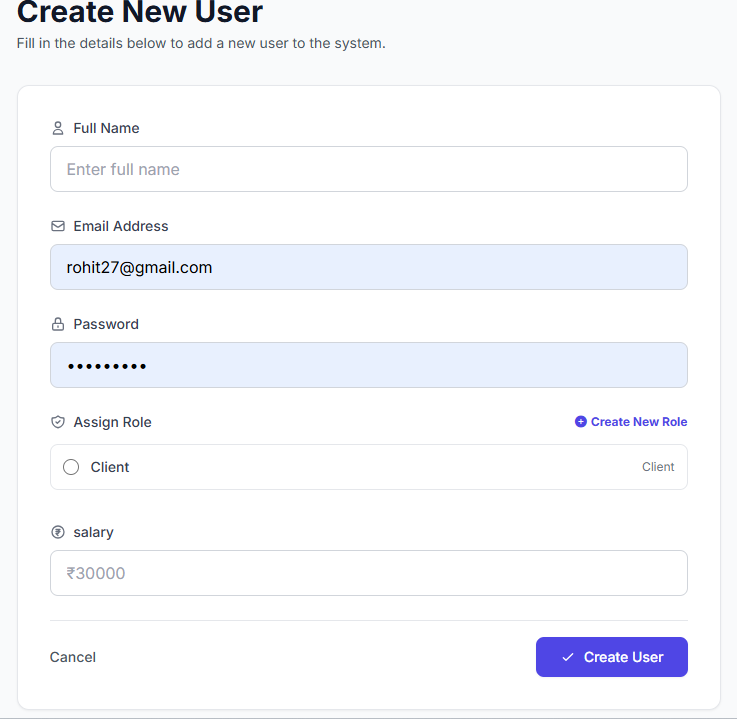
To add a team member, navigate to the Users section and click on the "Add New User" button. Fill in the following required details:
Personal Info
Full name, professional email, and a secure password.
Salary Details
Define the monthly compensation for the user.
Instant Role Creation
For maximum convenience, you can use the "Create New Role" field available directly inside the user form. This allows you to define a new position instantly without leaving the creation process.
Admin Tips
Always verify the email address to ensure the user receives their login credentials correctly.
Regularly review roles to maintain high security standards across your organization.
Build Your Dream Team
Start organizing your workforce with ZynCRM's advanced user management tools.